Aftermarket Keyless Remotes: Types, How They Work, and Buying Guide
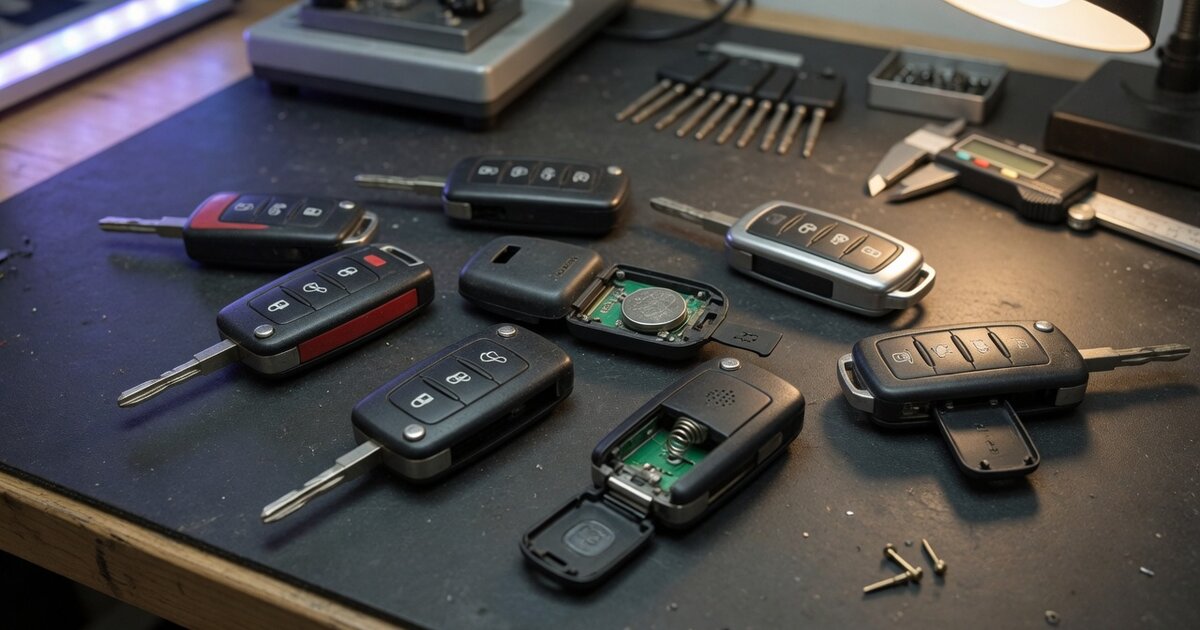
A keyless remote is the handheld transmitter that lets a driver lock, unlock, or otherwise control a vehicle without turning a physical key in a door lock. The category covers two broad families of hardware. A basic remote (sometimes called a keyless entry remote or remote key) pairs a traditional mechanical blade with buttons for locking, unlocking, and often trunk release or panic alarm, but it does not let the car start on its own and generally has no proximity awareness. A smart or proximity remote goes further: it uses radio frequency identification so the vehicle senses the fob within roughly one to two meters, unlocking doors as the driver approaches and allowing push-button start with no button press and no blade insertion at all.
For shops and technicians, "keyless remotes" as a category really means the aftermarket and replacement product landscape: OEM-sourced parts, remanufactured OEM units, and third-party aftermarket transmitters that are built to match an original part's frequency, protocol, and FCC identification. That landscape sits apart from the process of teaching a specific new remote to a specific car, which is its own job once the right hardware is in hand. This article focuses on the remote itself — what the different products are, how the underlying RF and rolling-code technology works, and what to check before ordering one.
How it works
Nearly every keyless remote transmits over radio frequency, most commonly 315 MHz in North America and 433.92 MHz across much of Europe and Asia. Each transmitter carries a unique identification code that is broadcast in the RF signal whenever a button is pressed. A receiver module in the vehicle listens for that signal and checks the transmitted code against the codes stored in its memory; if there is a match, the corresponding command executes. This basic scheme applies to simple lock/unlock remotes as much as it does to more capable smart keys.
Proximity systems layer additional hardware on top of that same RF foundation. Antennas built into the vehicle's body continuously poll for a smart key's presence, and when the key answers from within range, the car authorizes door unlocking and, with the brake pressed and a start button pushed, engine start — all without the driver handling the fob directly.
Security on both remote types relies heavily on rolling code (also called hopping code) technology. Instead of transmitting the same fixed code every time, a rolling-code system generates a new code with each use, following a sequence known only to the transmitter and the receiver's internal counter. The process runs in stages: an initial synchronization pairs the fob to the vehicle's locking system, each subsequent press generates the next code in the sequence, a counter increments to track position, and the receiver verifies the incoming code falls within an acceptable window of that counter. This makes it far harder for an intercepted signal to be replayed successfully than it would be with an old fixed-code system, and it's the reason a fob that has been pressed many times out of range of the car can sometimes need resynchronization.
What to consider
Because "keyless remote" covers such a wide range of hardware, sourcing the correct one matters as much as the programming step that follows. Before ordering or stocking a replacement remote, check the following:
- Confirm the operating frequency (315 MHz, 433.92 MHz, or another regional band) matches the vehicle — a mismatched frequency will not communicate with the receiver at all, even if the fob looks identical.
- Match the FCC ID exactly where possible; it identifies the radio transmitter itself, not just the case, so a different FCC ID can mean a different chipset even on a visually identical remote.
- Decide between OEM, remanufactured OEM, and third-party aftermarket stock, and weigh reliability and warranty against price for each option.
- Verify the button layout and functions (lock, unlock, trunk, remote start, panic) match what the customer's vehicle actually supports.
- Check whether the remote needs to be paired with a working transponder/immobilizer chip or key blade, since some vehicles use a combined key-and-remote unit rather than a standalone fob.
- Confirm battery type and that a fresh battery is used during setup, since a weak battery is a common cause of failed programming attempts.
- For proximity/smart keys, confirm the vehicle's specific smart-key generation, since these systems vary more between model years than basic RF remotes.
- Check whether the target vehicle allows self-programming or requires dealer-level or professional programming equipment.
- Keep a record of how many remotes are already programmed to the vehicle, since some systems have a limited number of memory slots and adding a new one can require re-adding existing ones.
Common mistakes to avoid
Most keyless remote problems that reach a shop trace back to a handful of avoidable errors made at the sourcing or setup stage rather than a defective part. Being deliberate at each step saves a second order and a second visit.
- Assuming compatibility based on appearance alone; two remotes can look nearly identical while using different frequencies or FCC IDs.
- Buying no-name remotes that list no FCC ID at all, which makes verifying frequency and protocol effectively impossible before purchase.
- Skipping the programming sequence's exact order or timing, which many vehicles require precisely to enter and confirm a learn mode.
- Overlooking existing paired remotes, so that programming a new one accidentally erases another owner's working fob.
- Ignoring immobilizer/transponder requirements, as seen in cases like the Xhorse VVDI2 keyless key learning issue and solution, where a keyless key fails to learn until the immobilizer side of the process is handled correctly.
- Using a depleted battery during setup, which can cause a programming attempt to fail intermittently and get misread as a bad remote.
Frequently asked questions
What is the difference between a keyless remote and a smart key?
A basic keyless remote uses RF buttons to lock and unlock doors and typically works alongside a mechanical key blade, but it cannot start the engine by itself. A smart or proximity key uses RFID so the vehicle detects it automatically within a short range, enabling hands-free unlocking and push-button start without the driver pressing anything or inserting a key.
Will any aftermarket remote work on any car?
No. Compatibility depends on matching the correct operating frequency, the FCC ID or equivalent transmitter identity, and the vehicle's specific protocol and button layout. A remote that looks the same as the original can still fail to communicate if any of these do not match the vehicle it is intended for.
Why do keyless remotes use rolling codes instead of a fixed code?
A fixed code can be intercepted and replayed by an attacker to unlock the vehicle later. Rolling code technology generates a new code for every transmission, synchronized between the fob and the receiver's counter, which makes a captured signal far less useful since it typically will not match the next expected code.
Can I program a replacement keyless remote myself?
On some vehicles, especially older models, self-programming is possible using a sequence entered through the ignition or door locks with no special tools. Many newer vehicles, particularly those with proximity smart-key systems, require dedicated programming equipment or dealer-level access instead.
How many memory slots does a vehicle have for keyless remotes?
Many vehicle receiver modules store a limited number of transmitter codes in fixed memory slots, and this number varies by make and model. Programming a new remote on a system with limited slots can, on some vehicles, overwrite an older remote's code, which is why it helps to know how many are already in use before adding one.
What should I check first if a new remote doesn't work?
Start with the basics: confirm the battery is fresh and correctly seated, verify the remote's frequency and FCC ID actually match the vehicle, and re-run the programming sequence carefully in the exact order the vehicle requires, since many failures come from a skipped step rather than defective hardware.