Diagnostic Test Machine for Cars: What It Is and How It Works
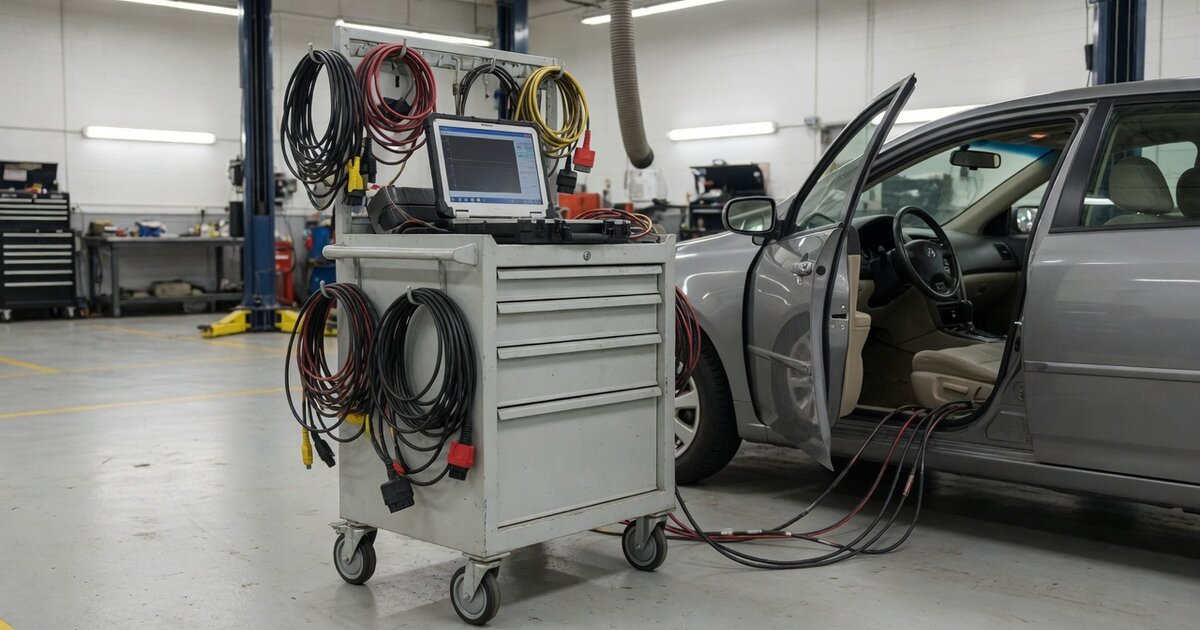
A diagnostic test machine for cars, often called a scan tool or code reader, is a device that connects to a vehicle's onboard computer network to read fault codes, monitor live sensor data, and in many cases command individual modules to run tests. Every modern car built for sale in the United States since 1996 carries an onboard diagnostics port, and the standardized system behind it is what lets a handheld or shop-grade machine talk to the engine, transmission, and other control units without needing a manufacturer-specific interface for basic checks.
These machines matter because modern vehicles are managed by dozens of interconnected computers rather than a handful of mechanical linkages. When something goes wrong, a warning light rarely tells the whole story on its own. A diagnostic machine translates the car's internal error reporting into a code and, often, a plain-language description, which narrows down where a technician or owner should start looking. Some machines stop at reading and clearing codes, while others reach much deeper into the vehicle's systems, offering live data graphs, bi-directional control of components, and access to service functions that only a handful of years ago required a trip to the dealership.
The category spans a wide range: inexpensive code readers meant for home use, mid-range scan tools aimed at independent shops, and professional-grade platforms used by dealerships and specialty technicians. Choosing the right one depends heavily on what a person actually needs to do, since the gap in capability between the cheapest and most expensive machines is large.
How it works
A diagnostic machine physically connects to a vehicle's diagnostic connector, typically located under the dashboard, and communicates with the car's control modules over a shared data network. In most vehicles built in the last decade or so, that communication runs over a CAN bus, a standardized data highway that links the engine control unit, transmission control unit, ABS module, airbag module, and other systems so they can all be addressed through one physical connection. Older vehicles may use earlier protocols, which is one reason compatibility varies more with age than with brand.
Once connected, the tool requests information using a defined set of diagnostic services. It can pull stored and pending diagnostic trouble codes, which are generated whenever a module detects a value or condition outside its expected range, and it can also request live parameters such as engine RPM, coolant temperature, fuel trim, or oxygen sensor readings in real time. Basic tools present this as a static code and a short description. More capable machines display it as a live, scrolling graph, which is useful for catching intermittent faults that a single snapshot would miss.
Beyond emissions-related generic codes, many modules also store manufacturer-specific codes and support deeper functions that generic OBD access does not expose, such as resetting service reminders, calibrating steering angle sensors, or performing guided component tests. Some professional platforms extend into module programming and coding, which is functionally related to specialized procedures like resetting VAG MLB keys for use on other cars, where the tool has to write configuration data back to a control unit rather than simply reading it.
What to consider
Not every diagnostic machine is built for the same job, and matching capability to actual need avoids both overspending and being stuck without a function you turn out to require. Before buying, it helps to think through how the tool will actually be used day to day, not just what it can theoretically do.
- Whether you need basic code reading and clearing or deeper functions like bi-directional control and module coding.
- Compatibility with the specific makes, models, and model years you actually work on, since manufacturer-specific coverage varies widely between tools.
- Whether the device requires a wired connection, Bluetooth, or Wi-Fi, and how that affects reliability during live data streaming.
- Software update policy and cost, since new vehicles and new codes are added continuously and outdated software loses relevance quickly.
- Whether the tool supports CAN FD and other newer communication protocols required by many recent vehicles.
- Build quality and support for shop environments if the tool will see daily professional use rather than occasional home diagnostics.
- Availability of service functions such as oil resets, battery registration, or DPF regeneration if those tasks are part of the job.
- Screen size, interface, and whether results are explained in plain language or require separate lookup.
- Total cost including subscriptions, since some professional platforms charge recurring fees for continued database access.
Common mistakes to avoid
Diagnostic machines are only as useful as the way they are used, and a few recurring mistakes lead people to misdiagnose problems or buy the wrong tool entirely.
- Assuming a code name alone identifies the fix, when a code only points to a symptom area and still requires further testing.
- Clearing codes without recording or addressing the underlying cause, which can mask an intermittent problem until it resurfaces.
- Buying a basic code reader for work that actually requires bi-directional control or manufacturer-specific functions.
- Ignoring protocol and software compatibility with newer vehicles, especially those requiring CAN FD support.
- Skipping regular software updates, which leaves a tool unable to correctly read newer vehicles or recent code definitions.
- Relying on a single live data reading instead of monitoring trends over time when chasing an intermittent fault.
Frequently asked questions
What is the difference between a code reader and a full scan tool?
A code reader is generally limited to reading and clearing generic diagnostic trouble codes, offering little beyond that. A full scan tool goes further, typically adding live data streaming, access to manufacturer-specific codes across multiple modules, and in professional versions, the ability to send commands back to the vehicle for tests, resets, or calibrations.
Can a diagnostic machine tell me exactly what part to replace?
Not directly. A diagnostic trouble code points to a system or circuit that reported an issue, but confirming the actual failed component usually requires additional testing, such as checking wiring, live data trends, or component-specific procedures. Treating a code as an automatic parts list is a common source of unnecessary repairs.
Do all diagnostic tools work on every car?
Generic OBD2 functions work across nearly all vehicles built for sale in the United States since 1996, but manufacturer-specific functions and deeper module access vary significantly by brand and tool. Older vehicles may also use different communication protocols, so checking compatibility with your specific make, model, and year matters.
Is a cheap consumer scanner worth buying for home use?
For basic tasks like checking why a check engine light is on or clearing a code after a repair, an inexpensive scanner is often sufficient. It becomes limiting quickly if you need live data graphing, bi-directional tests, or manufacturer-specific service functions, which are generally reserved for mid-range and professional tools.
Why does a diagnostic tool need regular software updates?
Vehicle manufacturers continuously add new models, new modules, and new diagnostic trouble codes. A tool running outdated software may fail to recognize a newer vehicle at all, misread its systems, or lack definitions for recently introduced codes, which reduces its usefulness even if the hardware itself still functions correctly.
Can a diagnostic machine damage my car?
Basic code reading and live data monitoring carry essentially no risk since they only request information. Functions that write data back to a module, such as coding, calibration, or programming procedures, carry more risk if interrupted or used incorrectly, which is why those functions are usually reserved for more experienced users or professional tools.