Key Fob Battery: Types, Signs, and Replacement Steps
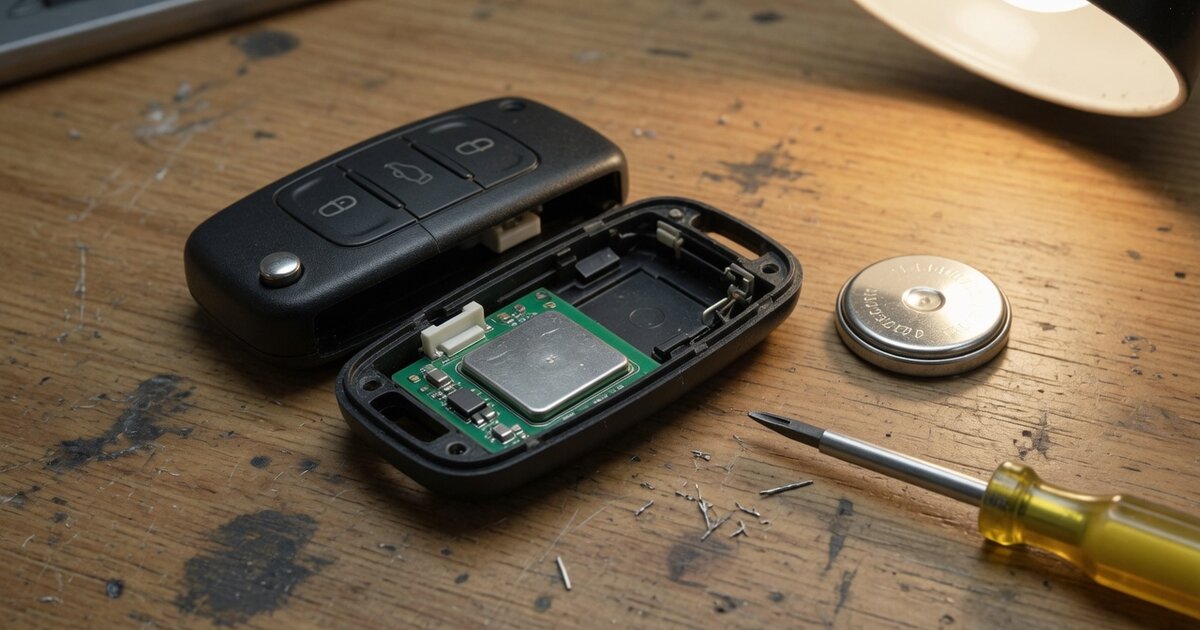
A car key fob feels like it should just work forever, until the day it doesn't. Most keyless entry remotes and smart keys run on a small lithium coin-cell battery, and like any battery it wears down with regular use and simply gets weaker year after year. When that cell finally drops below the voltage the fob's circuit board needs, the buttons quit responding, the doors stop unlocking from a distance, or a smart key stops talking to the car at all.
The good news is that a weak fob battery rarely fails without warning. Drivers typically notice the remote's range shrinking first, needing to stand closer to the car before the doors respond, then a delay between pressing the button and hearing the locks click, then having to press the button two or three times before anything happens. Many newer vehicles even display a dedicated low-battery warning on the dashboard once the fob reports weak voltage, which is one of the more reliable early signals available.
Because the fix is usually a five-minute job with an inexpensive coin cell, key fob battery problems are one of the easiest automotive issues to diagnose and resolve, provided the symptoms are correctly matched to a battery and not to a physical fault, such as what to check after dropping a key fob, which can mimic a dead battery.
How it works
Nearly every modern key fob, whether it is a basic push-button remote, a switchblade key with a folding blade, or a full proximity smart key, is powered by a small lithium coin-cell battery mounted directly against the circuit board. The two sizes that show up across the vast majority of vehicles are the CR2032 and the CR2025. The CR2032 is the thicker of the two, at roughly 3.2 millimeters, and generally holds more capacity, while the CR2025 is a slimmer cell used in fobs designed to be flatter. Some proximity smart keys, particularly on trucks and larger SUVs, use a bigger CR2450 cell for extra range and longevity, and a handful of older or compact fobs use a CR2016. The number stamped on the battery isn't arbitrary: it encodes the diameter and thickness, so a battery with the wrong second half of the code simply will not sit flush in the holder.
Opening the fob is usually the only tricky part of the job. Push-button remotes typically split apart along a seam, with a small notch on one edge where a coin or flat screwdriver can be inserted to gently pry the halves apart. Switchblade keys often hide the battery behind a small panel held by a clip or a single screw, accessed after sliding the metal key blade out of its slot. Once the case is open, the old battery lifts out of a plastic clip or lever; before removing it, it helps to note which side faces up, since coin cells only work one way. The new battery goes in facing the same direction, the case snaps or screws back together, and the remote should be tested immediately.
What to consider
A few details separate a clean battery swap from a frustrating one. Before buying a replacement or popping the case open, it helps to confirm the basics rather than assume every fob uses the same cell.
- Check the fob for a printed battery code, or look it up by exact make, model, and year, since even siblings within the same brand sometimes use different cell sizes.
- Buy from a retailer with reasonable turnover; lithium coin cells have a shelf life, and old stock can arrive already partially discharged.
- Handle the new battery by its edges rather than the flat faces, since oils from fingertips can leave residue that affects contact quality.
- Note the polarity of the old battery before discarding it so the replacement goes in facing the correct direction.
- Inspect the metal contacts inside the fob for corrosion or debris while the case is open, since clean contacts matter as much as a fresh battery.
- Expect roughly two to three years of service from a fresh cell under normal use, shorter if the fob is used frequently or kept in cold conditions.
- Cold weather reduces a lithium cell's usable output, so a fob that struggles mainly in winter may still have some life left once temperatures rise.
- Keep the vehicle's programming or relearn steps in mind for smart keys, since some proximity systems need a brief resync after the case is reopened.
- Dispose of the old coin cell responsibly rather than in household trash, since most retailers that sell batteries also accept used ones for recycling.
Common mistakes to avoid
Most fob battery jobs go wrong in predictable ways, and nearly all of them are avoidable with a little patience.
- Prying the case open with a metal blade jammed against the circuit board, which risks scratching traces or shorting the battery contacts.
- Installing the new battery upside down, which can leave the fob completely unresponsive even though the battery itself is fresh.
- Assuming a weak or dead fob is always a battery issue, when a cracked circuit board or a knocked-loose battery contact from a drop can produce the same symptoms.
- Buying a mismatched cell size because the packaging looks similar, then forcing it into a holder it doesn't fit.
- Ignoring a low-battery dashboard warning until the fob fails completely, sometimes at an inconvenient moment like a locked car in a parking lot.
- Forgetting that some smart keys require a short relearn procedure after the battery is swapped, similar to the steps covered in this Toyota smart key battery replacement and relearn procedure.
Frequently asked questions
What battery does my key fob use?
Most key fobs use a CR2032 or CR2025 lithium coin cell, and the exact size is usually printed inside the fob near the battery compartment or listed in the owner's manual. CR2032 is thicker and slightly higher capacity, while CR2025 fits slimmer fob designs. Some larger smart keys use a CR2450, and a few older fobs take a CR2016, so it's worth confirming the code before buying a replacement.
How long does a key fob battery last?
Under normal daily use, most fob batteries last around two to three years before the range and response time noticeably decline. Frequency of use, storage conditions, and temperature all affect how long a given cell holds up. Cold weather in particular reduces the usable output of lithium coin cells, so a fob that seems weak mainly in winter may simply be struggling with the cold rather than being fully depleted.
What are the signs of a dying key fob battery?
Early signs include a shrinking effective range, needing to stand closer to the car for the remote to work, and a short delay between pressing a button and the locks responding. As the battery weakens further, the fob may need repeated button presses to register a command, and many newer vehicles will display a low-battery warning on the dashboard before the fob stops working entirely.
Can I replace a key fob battery myself?
Yes, replacing a fob battery is a simple job most drivers can do at home with a small flathead screwdriver or a coin and the correct replacement battery. The case typically pries open along a seam or behind a small panel, the old battery lifts out, and the new one is inserted facing the same direction before the case is closed back up.
Why does my key fob still not work after a new battery?
If the fob stays unresponsive after a fresh battery, the new cell may be installed backward, the contacts inside the case may be dirty or corroded, or the fob may have physical damage unrelated to the battery, such as a cracked board or a jarred connection from being dropped. In those cases the issue usually needs a closer physical inspection rather than another battery swap.
Do smart keys need reprogramming after a battery change?
Typically no, a routine battery swap does not erase a smart key's programming, since that data is stored in the fob's chip rather than tied to battery power. Occasionally a proximity key needs a brief resync with the vehicle after the case has been reopened, so if the key doesn't respond right away, a short relearn sequence following the manufacturer's steps usually resolves it.