Xhorse KTP: Bench-Mode Programming on the Key Tool Plus
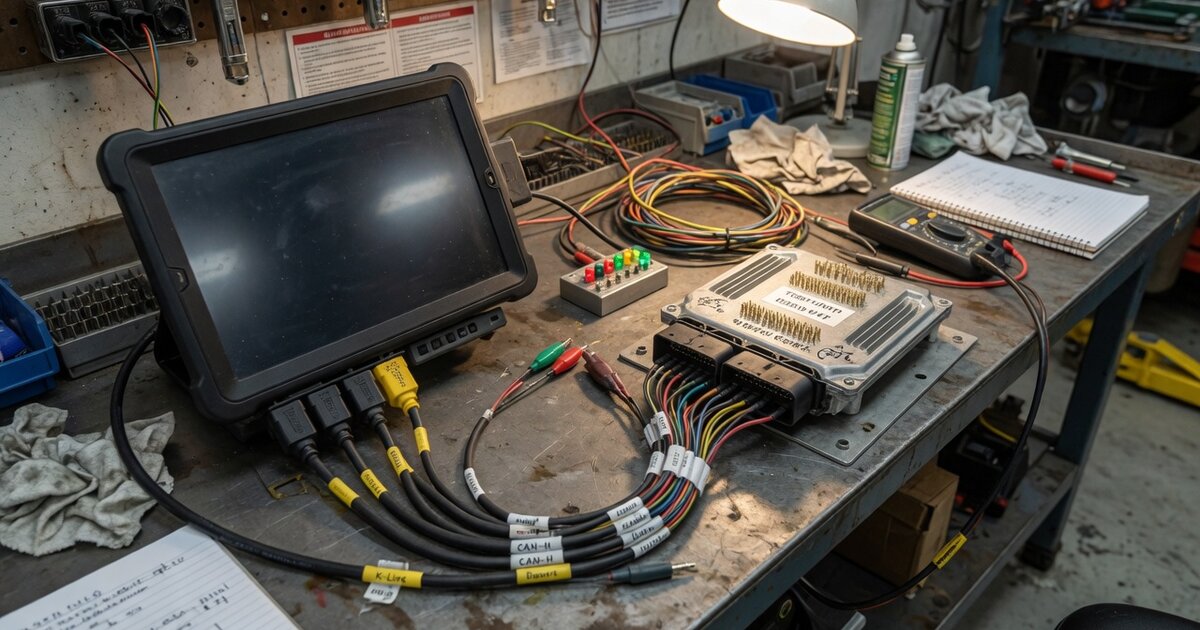
Search for “Xhorse KTP” and you’ll find surprisingly little that spells out what the letters stand for. There is no standalone device called the KTP-BOX in Xhorse’s current lineup or in the catalogs of its major resellers — what locksmiths and technicians actually mean by “Xhorse KTP” is the VVDI Key Tool Plus Pad, an all-in-one Android tablet that Xhorse and the trade routinely shorten to “Key Tool Plus” or just “KTP.” The confusion is understandable: the Key Tool Plus does include genuine bench-level, chip-off-style programming access, in the same category as dedicated boot-mode boxes. This article grounds the KTP name in the actual product, explains what its bench function does, and flags what to check before you buy.
What it is and what it does
The Key Tool Plus Pad is a 10.1-inch Android tablet built around locksmith work: key programming, immobilizer programming, and general vehicle diagnostics live in one interface, alongside a “Prog” function for direct chip-level access. Through Prog, the tool reads and writes EEPROM and FLASH memory on immobilizer, BCM, and instrument-cluster boards, performs CAN-based ECU programming, and can auto-detect switch pins and chip pins on unfamiliar boards — the same broad category of work covered in more depth in our Godiag GPT Boot Mode Explained guide, which walks through the general bench/boot-mode concept that both tools share.
Where the Key Tool Plus differs from a standalone boot-mode box is packaging. Instead of a separate bench unit, Xhorse sells a solder-free adapter set — documented at around sixteen pieces — that clips onto immobilizer and BCM boards without desoldering the chip. Vendor listings show adapters for BMW CAS3/CAS4 and FRM modules, Porsche BCM, Land Rover KVM, Volvo KVM and CEM-1/CEM-2, and Honda/Hyundai/Kia dash boards built around MB91F-family chips. Cabled into the tablet, these adapters let a technician pull or write immobilizer data off the vehicle, which is exactly the kind of access GODIAG’s boot-mode tools are built for, just delivered as tablet-plus-adapters rather than a dedicated box.
The Key Tool Plus is also a full member of Xhorse’s wider ecosystem rather than a standalone gadget. It’s built by the same company covered in our overview of the Xhorse brand and its key programming tools, and it hands off cut work to Xhorse’s key-cutting machines — Condor, Dolphin, and Panda models — once a key has been programmed or a remote generated on the tablet. Hardware-wise, reseller specs list a 2,400×1,080 anti-glare display, an eight-core 2GHz processor, 4GB RAM with 128GB storage, Android 9, a 10,000mAh battery with 30W fast charging, and Bluetooth 5.0 plus dual-band WiFi — closer to a rugged consumer tablet than a purpose-built diagnostic box.
What to consider before buying
License tiers matter more than the base unit price. Vendor listings show bench-level extras — BMW ISN reading over bench mode, VW MQB48-NEC35xx access, and BMW motorcycle OBD key learning — sold as separate paid licenses on top of the base tablet, and the “Advanced” version bundles MQB 5C/5D upgrades that the base version doesn’t include. Before ordering, confirm which license tier a listing actually includes rather than assuming bench-mode coverage for your target brand is bundled in.
The solder-free adapter set is sold separately from the tablet in most listings, and it is what turns the Key Tool Plus from an OBD-based programmer into a genuine bench tool. If your shop’s work leans toward all-keys-lost jobs on BMW, Porsche, Land Rover, or Volvo — where the module has to come off the car — buying the tablet without the adapter set leaves that capability unused. Conversely, if most of your jobs are in-vehicle OBD programming, the adapters may be a cost you don’t need yet.
Coverage claims are broad on reseller pages — figures like 20,000+ supported models show up regularly — but those numbers bundle OBD diagnostics, immobilizer programming, and bench work together, and don’t guarantee a specific module on your bench is covered at the firmware version you have. Check the specific chip family or module generation against current Xhorse documentation, not just the marketing copy, and remember it pairs into a wider workflow: keys cut on hardware such as the Xhorse Panda (XA006) after programming, so factor that into your total setup cost if you don’t already own a compatible cutter.
Common mistakes to avoid
Buyers regularly assume “KTP” refers to a separate bench box sold apart from the Key Tool Plus, order the wrong item from a listing, or pay for a bundle that duplicates hardware they already own. Others buy the base tablet expecting bench-level BMW or Porsche work out of the box, only to find the ISN-read or module-specific license is a separate purchase. A third common error is skipping the solder-free adapter set entirely, then discovering the tablet alone can't do the off-car board work that prompted the purchase in the first place. Finally, treating reseller model-count claims as a guarantee for one exact vehicle and module, rather than confirming against current coverage lists, causes avoidable returns and support tickets.
Frequently asked questions
Is "Xhorse KTP" a different product from the VVDI Key Tool Plus?
No. In trade use, "KTP" is simply the shorthand for the Key Tool Plus Pad. There is no separately branded "KTP-BOX" listed in current Xhorse or major-reseller catalogs; the bench/chip-level function is a built-in mode of the same tablet, extended with the solder-free adapter set.
Does the Key Tool Plus need a computer for bench-mode programming?
No. The Prog function and adapter workflow run directly on the tablet's Android interface — you cable the adapter to the module, connect it to the tablet, and work through the on-screen menus, without a separate PC in the loop.
What's the difference between the Key Tool Plus bench mode and a dedicated boot-mode box like GODIAG's?
The underlying access — reading and writing a chip's memory directly rather than through the vehicle's OBD port — is the same category of work covered in the general boot-mode guide linked above. The practical difference is packaging: GODIAG ships a dedicated bench box, while Xhorse builds the function into the Key Tool Plus tablet plus a separate adapter set.
Do I need extra licenses for BMW or Porsche bench work?
Often yes. Reseller listings show bench-specific features like BMW ISN reading sold as add-on licenses rather than included with every base unit, so confirm exactly what a given listing bundles before ordering if your work depends on a specific brand's bench access.
Can the Key Tool Plus cut keys on its own?
No, it programs and generates key/remote data but doesn't cut blades itself. It's designed to work alongside Xhorse's key-cutting machines, mentioned above, to complete the job from programming through to a cut key.
Is the Key Tool Plus only useful for luxury European brands?
Its bench adapter coverage leans toward BMW, Porsche, Land Rover, and Volvo modules, but the tablet's broader immobilizer and diagnostic functions extend to a much wider list of makes through OBD, including mainstream Japanese and Korean brands. Bench-level chip access is the narrower, brand-specific part of what it does.