Launch SmartLink: What It Is and How It Works
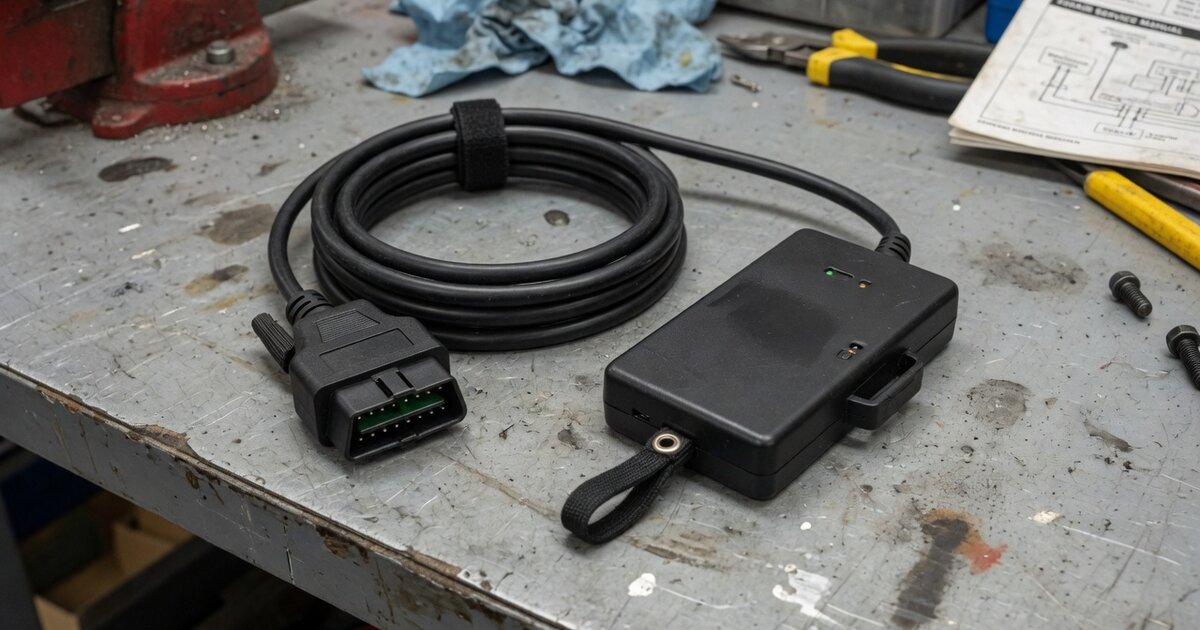
Search for "Launch SmartLink" and you'll land in the middle of a naming tangle: SmartLink, SmartLink C, SmartLink C V2.0, SmartLink B, SmartLink HD. None of these are scan tools you can pick up and use on their own. They're all variations on the same idea — a small VCI (vehicle communication interface) box that plugs into a car's OBD port and hands data off to something else, whether that's a Launch tablet, a PC running OEM software, or a remote technician on the other side of an internet connection. If you're trying to figure out whether SmartLink is the piece you need before you buy a Launch scanner or start an ECU reflash job, here's what the hardware actually does and where it fits.
What Launch SmartLink Actually Is
SmartLink is Launch's name for its family of VCI/J2534 pass-thru dongles that pair with X431-series tablets and scan tools (PAD V, PAD VII, PRO5, PRO3S+ Elite, and similar models) or with a PC. The current mainstream version, SmartLink C, is sold as a standalone box (Launch lists it under part number 301181118) with Bluetooth, Wi-Fi, and USB connectivity, plus support for newer vehicle communication protocols — DoIP, CAN-FD, and CAN 2.0. It connects to the vehicle through a 16-pin OBD cable and draws its power from the vehicle's OBD port itself; there's no separate DC input, so it can't be run off a bench power supply the way some standalone J2534 interfaces can.
Functionally, SmartLink C operates in three modes. As a plain VCI, it pairs with a Launch diagnostic tool over Bluetooth, Wi-Fi, or USB and streams vehicle data to that tool for analysis — the dongle itself isn't doing the diagnosing. As a local J2534 pass-thru device, it connects to a PC running OEM reprogramming software (GM's Techline Connect/SPS2 is one documented example) so that ECU flashing runs through the manufacturer's own tool rather than through Launch's app. And as a remote J2534 device, it can pair with a second unit, the SmartLink B, so a technician elsewhere can perform the reflash over the internet while the vehicle sits on someone else's lift. If you haven't worked with a J2534 interface before, it's worth reading up on what Launch J2534 is and what to know before you buy, since SmartLink is simply Launch's current hardware for that same J2534 role.
One distinction that trips people up: SmartLink C is not the same thing as SmartLink HD. SmartLink HD ships preloaded from the factory with both gasoline and heavy-duty diesel software plus the connectors needed for trucks, so no extra module is required. Regular SmartLink C is built around 12V/24V gasoline cars and some diesel cars — full heavy-duty truck coverage needs a separate SmartLink C Truck Module add-on. Buying the wrong one, or assuming the base dongle already covers trucks, is a common and avoidable expense.
What to Consider Before Buying or Using It
SmartLink is an accessory, not a complete tool. It needs a paired X431 tablet or a PC with OEM software to do anything useful, so before buying one, confirm whether the scan tool you already own — or are about to buy — includes a SmartLink dongle in the box or requires it as a separate purchase. Some current Launch scan tools bundle it; others list it as an optional add-on. It's a similar checkpoint to the one worth making with Launch's other tools — for example, if you're weighing a full scan tool purchase instead of just an interface, see what a tool like the Launch CRP919E actually covers before assuming you need SmartLink hardware at all.
If the goal is OEM-level ECU reprogramming, remember that SmartLink only carries the traffic — you still need the manufacturer's reprogramming software and, in most cases, a paid subscription to it (GM Techline Connect/SPS2, for instance, is a separate account and separate cost from anything Launch sells). On the PC side, SmartLink also requires Launch's own J2534 driver package to be installed before OEM software will recognize it as a pass-thru device; if you hit "device not found" errors, that's the first thing to check, and the J2534 VCI driver installation and troubleshooting guide walks through the general process.
Network quality matters more with SmartLink than with a typical Bluetooth OBD adapter, because both the remote-diagnosis mode and any live reflash depend on a stable connection. The device's touchscreen shows a color-coded delay indicator — green for a solid connection, yellow for unstable, red for a connection unsuitable for programming — and Launch recommends a wired connection over Wi-Fi for anything involving an actual ECU flash. Finally, before the remote-diagnosis features will work at all, the unit typically needs to be registered online with its serial number and activation code; skipping that step leaves those functions locked even though the hardware itself is connected and working.
Common Mistakes to Avoid
The most common mistake is treating SmartLink as if it were a full diagnostic scanner rather than an interface — it has no diagnostic logic of its own; the tablet, the OEM software, or a remote technician does the actual work. A close second is starting an ECU reprogramming session over an unstable Wi-Fi connection or a phone hotspot; an interrupted flash can leave a module in a worse state than before, so a wired network is the safer choice whenever reprogramming is involved. On the PC side, skipping the Launch J2534 driver installation before launching OEM software is a frequent cause of "pass-thru device not detected" errors that have nothing to do with the SmartLink hardware itself. Buyers also sometimes assume a base SmartLink C dongle already covers heavy-duty trucks, only to find they need the separate Truck Module or should have bought SmartLink HD instead. And because SmartLink's supported protocols center on CAN, CAN-FD, and DoIP, it isn't built for older K-Line-only vehicles the way some legacy full-featured J2534 interfaces are — don't expect it to behave like a universal solution across every model year.
Frequently asked questions
Is Launch SmartLink a standalone diagnostic scanner?
No. It's a VCI/J2534 dongle that has to be paired with a Launch tablet or a PC running OEM software to do anything. On its own it has no display for diagnostic results and no built-in diagnostic software.
What's the difference between SmartLink and SmartLink C?
"SmartLink" is used loosely as the family name across several Launch hardware generations. SmartLink C is the current standalone dongle version with Bluetooth/Wi-Fi/USB connectivity and DoIP/CAN-FD support; SmartLink HD is a separate, factory-preloaded variant built specifically for combined gasoline and heavy-duty diesel coverage without needing an add-on module.
Does SmartLink work with GM's Techline Connect/SPS2?
Yes — SmartLink can be used as a local J2534 pass-thru device with a PC running OEM software such as GM's Techline Connect/SPS2, which is one of the documented use cases for its local J2534 mode. You'll still need a valid subscription to GM's own software; SmartLink only provides the communication link.
Can SmartLink C be used for heavy-duty truck diagnostics?
Only with the separate SmartLink C Truck Module add-on. The base SmartLink C dongle is built around gasoline vehicles and some diesel cars, not full heavy-duty trucks. If truck coverage is the priority from the start, SmartLink HD is the model built to include it out of the box.
Does SmartLink support older vehicles with K-Line communication?
Based on its documented protocol support, SmartLink is built around CAN, CAN-FD, and DoIP rather than K-Line, so it isn't positioned as a general-purpose interface for older, pre-CAN vehicles the way some other J2534 devices are.
Do I need to register or activate SmartLink before using it?
For the remote-diagnosis platform features, yes — the unit is typically registered online with its serial number and an activation code before those functions unlock. Basic local VCI or local J2534 use may work without that step, but completing registration early avoids surprises if you plan to use remote reprogramming later.
Can SmartLink be powered from a bench supply instead of the vehicle?
No. SmartLink C draws its power from the vehicle's OBD port and doesn't accept external DC power, so bench setups that bypass the vehicle connector aren't supported the way they are with some other pass-thru interfaces.